Abstraction in computer science is a double-edged sword. It lets us assemble complex systems quickly, but it also hides how things actually work. People learn Docker without knowing what a container is, and deploy Kubernetes without understanding Linux namespaces, virtual ethernet devices, or bridge routing. To drill down into this, I built ppass: a minimal, lightweight PaaS in Go using native Linux kernel primitives. It can deploy isolated services and databases, route ingress traffic through a dynamically configured Envoy proxy, manage IP addresses via Redis, and enforce resource limits with cgroups v2. This post explains the architecture and implementation details.
Architecture Overview
The core of the system is built around five main components:
-
Linux bridge (
br0): A software bridge configured at10.0.0.254/24that serves as a virtual switch interconnecting all workloads and the ingress proxy. -
Envoy proxy: An ingress reverse proxy running in its own isolated network namespace on static IP
10.0.0.1, dynamically routing external domain traffic to internal services. -
Application Services: Workloads running in dedicated network namespaces created via
CLONE_NEWNET, each receiving a dynamic IP and protected by in-namespace firewall rules. -
Databases: Native PostgreSQL instances initialized with
initdb, executed under non-root credentials, and isolated inside dedicated network namespaces. -
Redis & IPAM: Stores active workload metadata and coordinates dynamic IP allocation across separate CLI commands on the
10.0.0.0/24subnet.
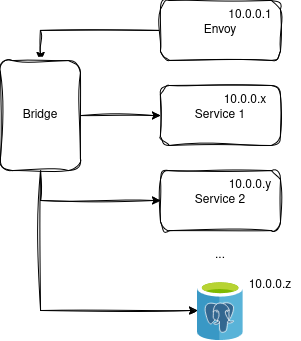
The software bridge (br0) is created first using the netlink library. When a new service starts, it is placed in its own network namespace and attached to the bridge via a virtual ethernet (veth) pair. Ingress traffic reaches the Envoy proxy first, which terminates the request and reverse-proxies it to the appropriate backend IP and port over the bridge network. Workloads can communicate with one another over the bridge (for example, a Python web app connecting to a PostgreSQL database on 10.0.0.x:5432), but they cannot be accessed directly from outside the host without going through Envoy.
Low-level configurations and isolations
Containers are not separate virtual machines; they are ordinary processes wrapped in unshared kernel namespaces. When ppass spawns a Python service, it isolates the network stack at process creation time using Go's syscall.SysProcAttr:
cmd := exec.Command("python3", s.Path)
cmd.SysProcAttr = &syscall.SysProcAttr{
    Setsid:     true,
    Cloneflags: syscall.CLONE_NEWNET, // Instantiates a dedicated network namespace
}

if err := cmd.Start(); err != nil {
    log.Fatalf("cmd.Start() failed: %v", err)
}
pid := cmd.Process.Pid
At this stage, the process starts in complete network isolation. It cannot access host interfaces, has no route table, and loopback is down.
To connect the process to the bridge, we generate a virtual ethernet (veth) pair. Because Linux kernel interface names are limited to 15 characters (IFNAMSIZ), we format and truncate the interface names safely:
v-<name>_<pid>_b: Stays on the host and attaches to bridgebr0as a master link.v-<name>_<pid>_n: Pushed into the target process's network namespace.
// 1. Create the veth pair
veth := &netlink.Veth{
    LinkAttrs: netlink.LinkAttrs{Name: vethInsideName},
    PeerName:  vethOutsideName,
}
netlink.LinkAdd(veth)

// 2. Attach host end to bridge
vethOutside, _ := netlink.LinkByName(vethOutsideName)
netlink.LinkSetMaster(vethOutside, bridge)
netlink.LinkSetUp(vethOutside)

// 3. Move inside end to the child process's network namespace via FD
f, _ := os.Open(fmt.Sprintf("/proc/%d/ns/net", pid))
defer f.Close()
netlink.LinkSetNsFd(vethInside, int(f.Fd()))
Once the interface is inside the namespace, we configure its IP address, set it UP, and bring up the loopback interface.
The Go Goroutine vs. Namespace Trap: One crucial detail when working with network namespaces in Go is that Linux namespaces are thread-bound, while Go's runtime multiplexes goroutines across multiple OS threads. When calling netns.Set() to enter a namespace, you must lock the OS thread:
runtime.LockOSThread()
defer runtime.UnlockOSThread()

origns, _ := netns.Get()
defer origns.Close()

targetns, _ := netns.GetFromPid(pid)
defer targetns.Close()

// Switch current thread to the container namespace
netns.Set(targetns)
defer netns.Set(origns)

// Configure interface, IP address, and default routes inside namespace...
To secure the workload, we also configure iptables firewall rules directly inside the namespace:
// Allow loopback and established connections
iptables -A INPUT -i lo -j ACCEPT
iptables -A INPUT -m conntrack --ctstate ESTABLISHED,RELATED -j ACCEPT

// Only accept ingress packets originating from within the 10.0.0.0/24 subnet
iptables -A INPUT -s 10.0.0.0/24 -j ACCEPT
iptables -A INPUT -j DROP
Filesystem & PID Isolation: The pivot_root Dance
As for the filesystem isolation, I am using rootfs, a minimal filesystem from Alpine. This, however, turned out to be much more complex than I originally anticipated.
To isolate the filesystem and processes, we combine two kernel flags: CLONE_NEWNS (Mount Namespace) and CLONE_NEWPID (PID Namespace). The mount namespace gives the process its own private mount table, and the PID namespace gives it an isolated process tree where it runs as PID 1.
However, achieving full filesystem isolation requires swapping the root directory of the container, and that's where the Go runtime introduces a tricky problem. In Go, exec.Command() does fork and exec together under the hood. Go does not allow running arbitrary Go code between fork and exec because Go's multi-threaded runtime (goroutines, GC, memory allocators) would deadlock if it attempted to run in a half-duplicated child process. If we called pivot_root in the parent CLI, it would alter the root filesystem for the entire host system(kaboom).
To solve this, we use the Self-Exec pattern. The parent CLI launches a new instance of itself via /proc/self/exe with an internal environment variable:
cmd := exec.Command("/proc/self/exe")
cmd.Env = append(os.Environ(),
    "_PAAS_CONTAINER_INIT=1",
    "_PAAS_SERVICE_PATH="+s.Path,
)
cmd.SysProcAttr = &syscall.SysProcAttr{
    Setsid:     true,
    Cloneflags: syscall.CLONE_NEWNET | syscall.CLONE_NEWNS | syscall.CLONE_NEWPID,
}
cmd.Start()
In main.go, we intercept this execution before Cobra even runs:
func main() {
    // If spawned as a container child, initialize the container and exit
    if os.Getenv("_PAAS_CONTAINER_INIT") == "1" {
        parser.RunContainerInit(os.Getenv("_PAAS_SERVICE_PATH"))
        return
    }

    // Otherwise, execute normal CLI commands (create, delete, list...)
    cmd.Execute()
}
Inside the child process (which is now safely inside its own mount namespace), we use pivot_root instead of the older chroot. While chroot only changes the apparent root for path lookups (and can be escaped by a root process), pivot_root allows us to swap the root filesystem and cleanly unmount the host:
func pivotRoot(newroot string) {
    // 1. newroot must be a mount point: self-bind mount it with MS_PRIVATE
    syscall.Mount(newroot, newroot, "", syscall.MS_BIND|syscall.MS_REC|syscall.MS_PRIVATE, "")

    // 2. Create putold directory inside newroot to temporarily hold the old host root
    putold := filepath.Join(newroot, ".oldroot")
    os.MkdirAll(putold, 0o700)

    // 3. Swap the root: newroot becomes '/', old host root moves to '/.oldroot'
    if err := syscall.PivotRoot(newroot, putold); err != nil {
        log.Fatalf("could not change root: %s\n", err)
    }

    // 4. Move current working directory to new root
    syscall.Chdir("/")

    // 5. Unmount and remove the old host root filesystem entirely
    syscall.Unmount("/.oldroot", syscall.MNT_DETACH)
    os.Remove("/.oldroot")
}
Finally, in RunContainerInit, we make the Python script accessible by bind-mounting its directory to /app inside rootfs, execute pivotRoot, mount a fresh /proc filesystem for the PID namespace, and call syscall.Exec to replace the Go process with Python:
func RunContainerInit(servicePath string) {
    absRootfs, _ := filepath.Abs("rootfs")

    // Bind-mount host script folder into /app in rootfs before pivoting
    appDir := filepath.Join(absRootfs, "app")
    os.MkdirAll(appDir, 0o755)
    syscall.Mount(filepath.Dir(servicePath), appDir, "", syscall.MS_BIND|syscall.MS_REC, "")

    // Pivot root into the isolated Alpine rootfs
    pivotRoot(absRootfs)

    // Mount fresh /proc for the new PID namespace (process is PID 1)
    os.MkdirAll("/proc", 0o755)
    syscall.Mount("proc", "/proc", "proc", 0, "")

    // Replace the Go binary with Python 3 inside the container
    pythonBin := "/usr/bin/python3"
    syscall.Exec(pythonBin, []string{"python3", servicePath}, os.Environ())
}
With this in place, the application is jailed inside Alpine rootfs with zero access to the host's /etc, /home, or binaries, and running ps aux inside the container only reveals its own process tree. The rootfs filesystem is very minimal we also needed to install Python inside of it. To do that, we first need to actually copy over the resolv.conf file for the DNS resolver. Then we chroot to the new filesystem and run apk add python:
# Copy over the resolv.conf file
sudo cp /etc/resolv.conf /home/d0sta/ppass/rootfs/etc/resolv.conf

# chroot and install python
sudo chroot /home/d0sta/ppass/rootfs && apk add python3
Redis use for IPAM and process management
A common problem when developing a CLI-based orchestrator is ensuring conflict-free dynamic IP assignment across distinct command invocations. Because every CLI command is an independent process, in-memory state vanishes after exit.
To solve this, we integrated go-ipam with a Redis backend to manage a persistent IP pool on the 10.0.0.0/24 subnet:
10.0.0.254: Reserved for host bridge (br0).10.0.0.1: Dedicated static IP for the Envoy load balancer gateway.10.0.0.2 – 10.0.0.253: Dynamically assigned to application services and databases.
Workload state is tracked in Redis under keys such as service:<name> and database:<name>, storing the process PID, assigned IP, and configuration path. When a workload is deleted via ./paas delete, the IP address is automatically released back to the IPAM pool in Redis, preventing IP exhaustion and stale state.
Ingress Routing with Envoy
Workloads do not expose host ports directly. Instead, Envoy runs inside its own isolated network namespace at 10.0.0.1. When a service is deployed:
- The service writes an Envoy cluster definition to
/etc/envoy/conf.d/<upstream>.yaml. ppassaggregates all active config fragments and executes a Go template (parser/templates/envoy.tmpl) to render a unified configuration at/run/envoy-paas.yaml.- Envoy is restarted or signaled to reload, routing requests by
Hostheader (e.g.second.local:8081orapi.local:8082) to the target container's IP and port.
Resource Restrictions with cgroups v2
To prevent runaway memory consumption or fork-bomb attacks, each process is enrolled in a dedicated cgroup v2 hierarchy at /sys/fs/cgroup/<pid>:
memory.max: Enforces memory ceiling (e.g.128M) and triggers kernel OOM kill on breach.cpu.max: Enforces CPU bandwidth limits (e.g.50000 100000for 50% CPU quota).pids.max: Restricts maximum number of processes and threads to prevent fork bombs.
v2Path := filepath.Join("/sys/fs/cgroup", strconv.Itoa(pid))
os.MkdirAll(v2Path, 0755)

// Write limits directly to cgroups v2 virtual files
if s.Limitations.Memory != "" {
    os.WriteFile(filepath.Join(v2Path, "memory.max"), []byte(s.Limitations.Memory), 0644)
}
if s.Limitations.CPU != "" {
    os.WriteFile(filepath.Join(v2Path, "cpu.max"), []byte(s.Limitations.CPU), 0644)
}
if s.Limitations.Pids != "" {
    os.WriteFile(filepath.Join(v2Path, "pids.max"), []byte(s.Limitations.Pids), 0644)
}

// Enroll process PID into the cgroup
os.WriteFile(filepath.Join(v2Path, "cgroup.procs"), []byte(strconv.Itoa(pid)), 0644)
Native Database Orchestration (PostgreSQL)
Databases are managed natively without heavyweight container layers. When deploying a PostgreSQL database:
- The data cluster is initialized using
initdbunder/var/lib/postgresql/data/<name>. - Privileges are dropped to the
postgressystem user using Go'ssyscall.Credential{Uid: uid, Gid: gid}. pg_hba.confis configured to accept connections from the bridge network (10.0.0.0/24).- The daemon is launched inside a dedicated network namespace with
memory.max(e.g.200M) andio.weightlimits, and linked tobr0.
Declarative Workflow
Deploying a workload uses a clean YAML manifest:
type: service
body: |
  name: api-service
  lb: true
  path: /home/d0sta/ppass/config_files/python/api_service.py
  technology: python
  lbconfig:
    upstreamname: api_service
    listenport: 8082
    domain: api.local
  limitations:
    memory: "128M"
    pids: "15"
    cpu: "50000 100000"
The ppass CLI parses the manifest, provisions networking, configures cgroups, updates Envoy, and registers the workload.
Service creation step-by-step
When sudo ./paas create <config.yaml> is executed, the following lifecycle steps take place:
- Parse & IP Allocation: Manifest is parsed and a dynamic IP (e.g.
10.0.0.3) is acquired from Redis IPAM. - Ingress Registration: The Envoy fragment is written and the template is rendered to
/run/envoy-paas.yaml. - Process Spawn: The process is launched with
CLONE_NEWNET, entering an empty network namespace. - cgroup Enrollment: A cgroup v2 directory is created and resource limits (memory, CPU, PIDs) are applied.
- Network Plumbing: A
vethpair is created, the host end is attached tobr0, and the container end is moved into/proc/<pid>/ns/net. - Namespace Configuration: Inside the namespace, the IP address is bound, interfaces are set
UP, andiptablesfiltering is configured. - State Persistence: The PID, IP, and config path are stored in Redis.
Service deletion step-by-step
When sudo ./paas delete service <name> is executed:
- Workload metadata is fetched from Redis.
- The process is killed via
SIGKILL. (When the process exits, the kernel automatically tears down its network namespace). - The service's Envoy YAML fragment is removed, and Envoy is restarted to purge the route.
- The assigned IP address is released back to the IPAM pool in Redis.
- The Redis entry is deleted. Any remaining hanging interfaces can be swept with
make cleanor./scripts/clean_interfaces.sh.
The project is open source on GitHub.